

 Screenshot of Streamingstar Video Capture
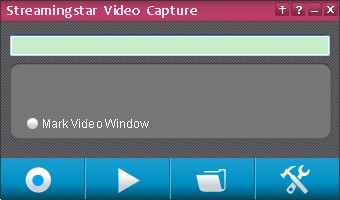
Mark Video Windows
Adjust the size of recording region
Start/stop 
Start and stop recording
Play 
Play the latest recorded video
Folder 
Open the folder containing recorded videos
Settings 
Set up audio Bit Rate, video Bit Rate and video frame per second
Always TOP 
Always on Top
More information 
See the recorded video information, Register Streamingstar Video Capture, Check for new version